Higgsfield is an AI content platform built around one core idea: lock a character’s identity once, then reuse it across unlimited images and videos. It covers ad-video generation, Cinema Studio’s cinematic camera control, Marketing Studio’s product-ad workflow, voice cloning and dubbing, an apps marketplace of one-click templates, and native mobile apps.
This review breaks down what the platform does, what it costs down to the credit, and how it compares to HeyGen, Kling, and Arcads, so you can decide whether it fits your workflow before signing up.
Higgsfield is an AI content platform for image generation, video generation, Cinema Studio’s cinematic camera control, Marketing Studio’s ad generation, voice cloning and dubbing, a marketplace of one-click apps and effects, and native mobile apps. Its standout feature is locked identity: generate a character once, then reuse it across unlimited future images and videos.
Its ugc-website-video workflow turns a website into a talking-head ad automatically: generate a character, write a script, capture live screenshots of the site, and composite everything into a finished video. Cinema Studio, Marketing Studio, and the audio and editing tools all draw from the same credit pool.
Best for: creators, agencies, and marketers producing video or ad content at volume.
Skip it for: a single one-off video, since the deeper features only pay off through repeated use.
Pricing shown below as of publishing. AI tool pricing changes frequently, confirm current plans on Higgsfield’s official pricing page before buying.
Disclosure: this article contains affiliate links. We may earn a commission if you sign up through the link above, at no extra cost to you.
What Is Higgsfield?
Higgsfield is an AI content platform built around one idea: lock a character’s identity once, then reuse it everywhere. It covers image generation, video generation, Cinema Studio, Marketing Studio, voice cloning and dubbing, a large marketplace of one-click templates and effects, direct TikTok publishing, a product-shot toolset for e-commerce sellers, and native apps on the App Store and Google Play.
The company is backed by Accel, Menlo Ventures, GFT Ventures, and AI Capital Partners at a valuation above $1.3 billion. It reports more than 25 million users and 850 million total generations, including 300 million videos.
Those figures come from Higgsfield’s own site rather than an independent audit, but they set useful context before trusting any platform with paid ad production.
What separates Higgsfield from a plain text-to-video generator is its workflow layer: a bundled, versioned production recipe that encodes an entire creative process instead of a single prompt. Its flagship recipe, ugc-website-video, turns a website into a talking-head ad.
Running that workflow looks like this:
- Generate one AI character and lock its identity for reuse.
- Write a script following the workflow’s built-in hook and pacing rules.
- Generate video clips of the locked character reading the script.
- Capture live screenshots of the website being advertised.
- Composite the clips, screenshots, and captions into a finished video.
The workflow can run through Higgsfield’s web dashboard or through its MCP integration, which lets an AI agent execute the full pipeline automatically instead of a person clicking through each step.
Key Features
Locked character consistency. Generate a character once, for a small one-time cost (roughly 2.6 credits, a fraction of what a single 15-second clip costs), then reuse that identity across unlimited video clips. This fixes the different-face-every-clip problem that undermines most AI video tools trying to look like one recurring creator.
Workflow bundles. The ugc-website-video workflow ships with its own rules for hook writing, pacing, camera framing, caption safe zones, and ad-compliance language, including a hard rule against fabricated income claims or fake UI screenshots. These are production standards built into the tool, not left to the user’s prompt-writing skill.
Cinema Studio. A video model built for cinematographic language: genre presets, speed-ramp effects, and reference elements for multi-character scenes.
Marketing Studio. A separate video model for UGC-style product ads, with its own hook and setting presets.
A production sandbox. Higgsfield’s agent tooling runs on a Linux sandbox with ffmpeg, Playwright, and Whisper pre-installed. Screenshot capture, caption alignment, and final compositing all happen inside Higgsfield’s own infrastructure, with no external editing software.
Batch generation. Independent clips can be submitted and polled in parallel instead of queued one at a time, which matters once a production run involves several clips plus B-roll.
A large one-click apps marketplace. Dozens of named templates, from face swap and product ads to trending meme formats, browsable in the web dashboard without writing a prompt. See “Apps Marketplace and Other Platform Tools” below for the full catalog.
Breadth beyond video. Image generation, voice cloning and dubbing, native editing tools, and a preset marketplace all draw from the same credit pool, so a video team gets image and audio tools without a second subscription.
Who It’s For
Faceless content creators building a YouTube or TikTok channel around one recurring persona are the clearest fit. Character locking solves their biggest production bottleneck directly.
Agencies and marketers producing UGC-style ads at volume get the same consistency plus compliance-aware workflow rules, cutting the review-rejection risk that comes with hand-written ad scripts.
Teams that need more than talking-head ads get Cinema Studio for narrative scenes and Marketing Studio for product-only formats, both under one account.
Anyone who wants a single one-off video is still probably better served by a simpler tool. The dashboard’s one-click Apps marketplace, Click to Ad and similar templates, narrows that gap, though output quality reportedly varies by template outside the character-locked workflow this review centers on.
How the Ad-Video Workflow Works
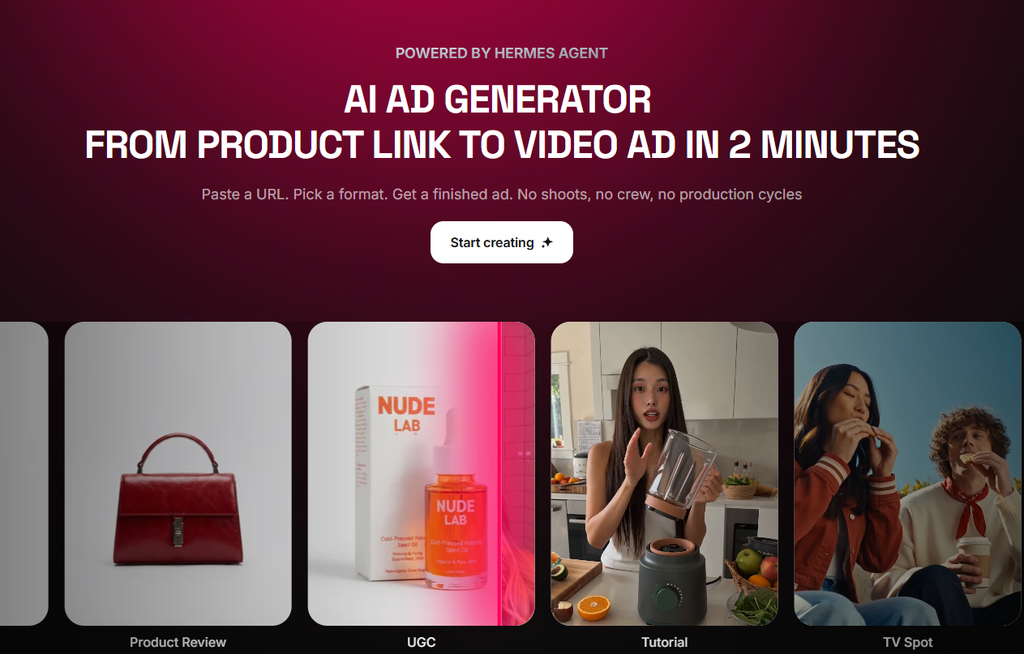
Character Setup and Scripting
The workflow starts with a source landing page and a target video length, typically 30 seconds. The first step generates a single AI character and locks its identity, then runs it through a quality-cleanup pass so it can be saved as a reusable reference.
The script stage enforces its own rules: a hook under eight words, natural spoken pacing, and a strict requirement that any screenshot shown be a live capture of the actual site, never a fabricated interface. A 30-second ad typically uses two 15-second talking-head clips, composited with captured screenshots and auto-generated captions.
Revisions
Revisions run inside the same pipeline. A flat cutaway can be swapped for new B-roll of the same locked character (a typing shot, a phone tap, a reaction shot), with motion-graphic text, animated captions, and zoom-punch edits added on key beats, all without touching a separate video editor.
The splice, caption burn, motion graphics, and final render happen inside Higgsfield’s own sandbox. A single 15-second clip typically renders in a few minutes, and a full revision pass with several new clips usually finishes within one working session.
Cinema Studio, Marketing Studio, and Audio Tools
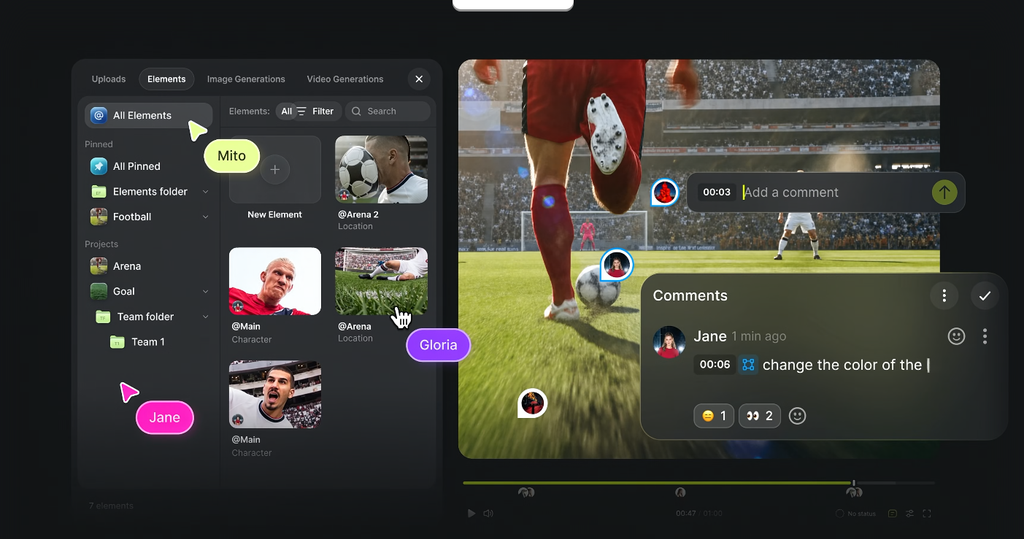
Cinema Studio
Cinema Studio is built for cinematographic language: camera details (lens type, focal length, aperture, push-in and pull-out moves) are described directly in the prompt, alongside genre presets and speed-ramp effects. A 6-second two-character scene costs about 9 credits.
The API exposes genre, speed-ramp, and shot-count as real parameters, but there’s no separate focal-length or aperture field the way Higgsfield’s web app reportedly offers. Through the API, camera control is a prompt-writing skill, not a settings panel.
Marketing Studio
Marketing Studio is a separate video model built for UGC-style product ads, with its own hook and setting presets. A 15-second vertical ad costs 150 credits, charged when the job queues rather than on completion.
The web dashboard’s UGC presets are built around saved product and avatar records. The same output can also be generated by supplying a product image and character directly as reference media, which queues and renders normally through the API.
Audio Tools
The audio suite covers text-to-speech voiceovers (0.6 credits), voice swapping on an existing clip while preserving its original timing (4 credits), and dubbing into another language with re-synced lip movement (90 credits), spanning 18 languages total.
Editing Tools
Reframe, video upscale, and background removal round out the toolkit, covering the same ground as the third-party “apps library” tricks shown in walkthroughs of the platform. Background removal on a product image costs 1 credit. Upscaling a clip to 4K through the Topaz engine costs 21 credits.
Reframe (aspect-ratio conversion, such as 16:9 to a wider 21:9) is the weak point in the editing set: it can fail with no clear error message. Spent credits are refunded automatically when it does, which limits the practical downside, but the tool itself doesn’t reliably produce a usable result.
Apps Marketplace and Other Platform Tools
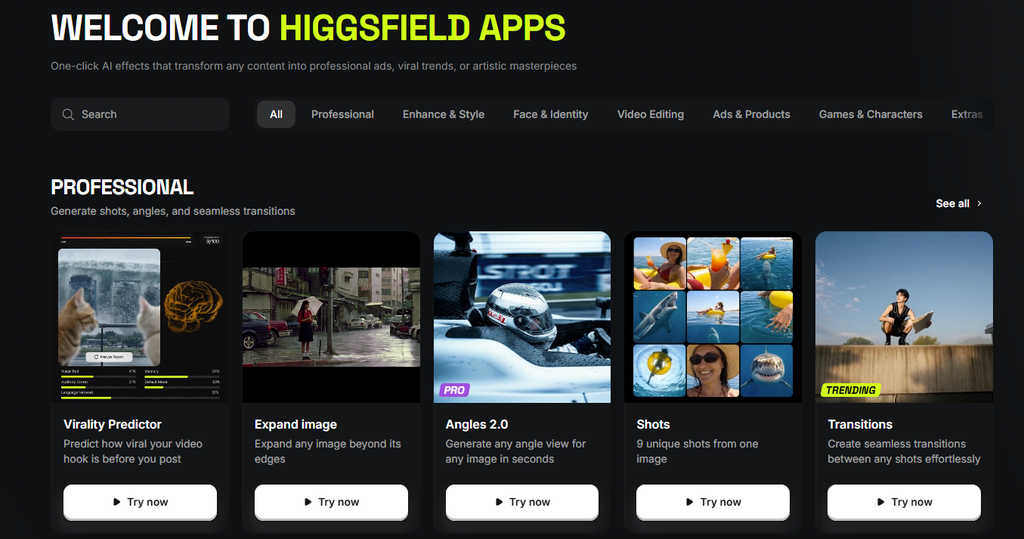
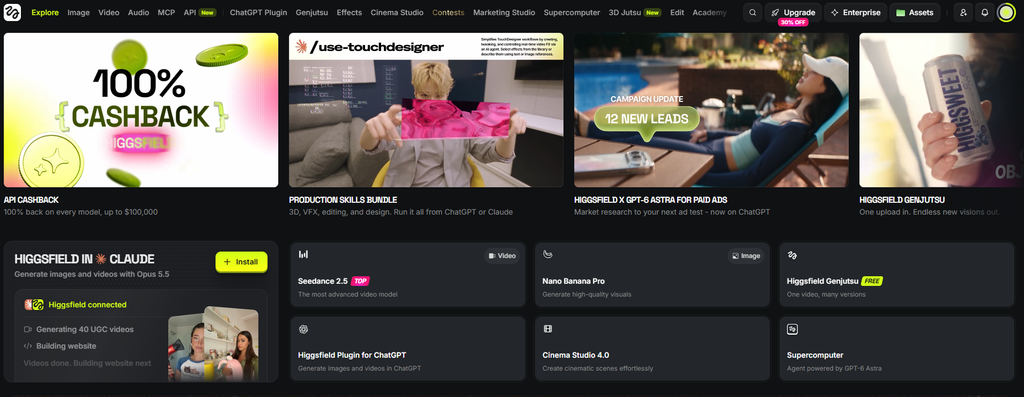
Beyond the ad-video, Cinema Studio, and Marketing Studio workflows, Higgsfield’s dashboard packages a lot more, most of it built for one-click browsing rather than prompt-writing.
The Apps Marketplace
Higgsfield’s dashboard includes a large catalog of named, one-click templates organized into categories: Professional (Virality Predictor, Angles 2.0, Shots, Transitions), Enhance & Style (Skin Enhancer, AI Stylist, Relight, Outfit Swap), Face & Identity (Face Swap, Headshot Generator, Recast, Video Face Swap), Video Editing (Video Background Remover, ClipCut, Breakdown), Ads & Products (Click to Ad, Billboard Ad, Bullet Time Scene, Truck Ad), and Games & Characters.
Two of those, Angles 2.0 and Shots, cover multi-angle and multi-shot generation, filling the gap the API alone doesn’t cover.
There’s also a rotating “Trending Templates” row of meme-style effects, things like On Fire, Skibidi, Mukbang, and Idol, aimed more at individual creators chasing a viral format than at agency ad production. Click to Ad is the closest of these to the core ad-video workflow: it converts a product link directly into a UGC-style ad without manually setting up character locking.
Popcorn, Supercomputer, and Soul
Popcorn turns a reference image into a 4, 6, or 8-frame storyboard, priced at around 5 credits per scene, before handing off to Cinema Studio for rendering. It’s a planning step ahead of the camera-language work Cinema Studio renders.
Supercomputer takes a plain-language brief and picks and sequences models itself, showing credit costs upfront before generating. Soul is Higgsfield’s image-model family, with more than 50 style presets (Y2K, street photography, and similar looks) for stills rather than video.
Speak and Mobile Apps
Speak is a dedicated talking-avatar interface with built-in motion presets (Walk & Talk, Car Talking, Makeup & Talk, Selfie) and audio-sync lip matching, a more guided version of the ad-video talking-head workflow. Higgsfield also ships native apps on the App Store and Google Play, so a creator can generate from a phone instead of the desktop dashboard.
Higgsfield Pricing: What It Actually Costs
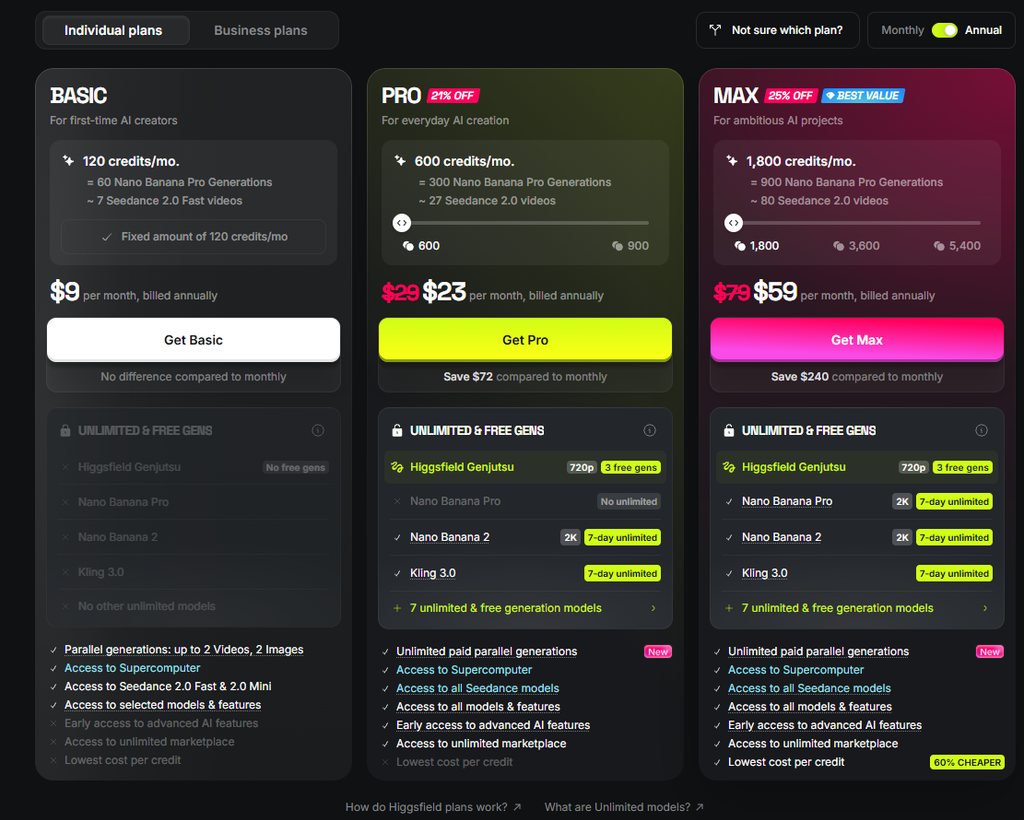
Plan Pricing
Higgsfield’s pricing page lists three individual plans, billed monthly. Basic runs $9 a month for 120 credits. Pro runs $29 a month for 600 credits. Max runs $79 a month for 1,800 credits and is marked as the best-value tier.
A separate “find the best plan for you” calculator on the same page generates a usage-scaled quote instead of a flat card price. Feeding in a moderate monthly workload (around 50 short videos and 60 images) priced out at 900 credits for $34 a month, still under the Pro label, so real-world usage can land well above the $29 entry price shown on the static card.
The Ultra Plan
A legacy plan called Ultra (3,000 credits for roughly $70 a month, billed annually) exists on some accounts but doesn’t appear on Higgsfield’s current public pricing page, which tops out at Max. Whether that’s a renamed lineup, a grandfathered rate, or a business-tier holdover isn’t confirmed publicly.
Confirm current plan names and pricing directly on Higgsfield’s official pricing page before signing up, since what’s publicly on sale today is Basic, Pro, and Max, not Ultra.
Free Plan and Trial
A free plan exists too, but it’s capped at a single generation with no commercial rights, more a look-around tier than a production one. New users can also start a 3-day trial for 100 MCP-only credits after card verification. That trial renews automatically into a paid plan unless cancelled first, worth knowing before signing up from a phone.
Cost Per Asset
Approximate credit costs by asset type, based on Higgsfield’s own credit pricing:
| Asset | Cost |
|---|---|
| Locked character (one-time, reused forever) | 2.6 credits |
| One 15-second talking-head clip | 180 credits |
| One short B-roll cutaway clip | 35 credits |
| One motion-graphic still image | 0.25 credits |
| One reference-element source image (character or environment) | 1.5 credits |
| 6-second Cinema Studio scene | 9 credits |
| 15-second Marketing Studio UGC ad | 150 credits |
| Voiceover line (text to speech) | 0.6 credits |
| Voice swap on an existing clip | 4 credits |
| Dubbing and lip-resync into another language | 90 credits |
| Background removal (image) | 1 credit |
| Video upscale to 4K (Topaz) | 21 credits |
A 30-second talking-head ad (two clips) runs about 360 credits. Add three B-roll cutaways for a polished cut and it’s roughly 465 credits total. Producing a full round of content across Cinema Studio, Marketing Studio, all three audio tools, and the editing tools adds about 280 credits on top.
At the Ultra-tier rate (about 2.3 cents per credit), a finished, captioned talking-head ad costs somewhere between $8 and $11, and covering the rest of the platform (Cinema Studio, Marketing Studio, audio, and editing) adds about $6.50 more.
Buying the same credits today through the public Max plan (1,800 credits for $79, about 4.4 cents per credit) would push those same numbers closer to $16 to $20 for the ad and about $12 for the wider platform coverage, since Max costs more per credit than the Ultra rate above.
One catch: one-time credit top-ups expire 90 days after purchase, so credits bought for a single campaign need to get used inside that window. Other reviewers comparing Higgsfield’s pricing to competitors have made a similar point about the credit system generally: with model and plan both affecting the final rate, the cost of any one generation isn’t always obvious upfront.
Ease of Use and Learning Curve
Higgsfield’s web app is straightforward for a single generation, more one-click marketplace apps than a learning curve. The deeper production power sits behind the MCP integration and the manual controls in Cinema Studio and Marketing Studio, which take more trial and error to use well.
Driving a new video generation from a locked character requires the right combination of reference role and generation mode; a mismatched combination is rejected with only a terse validation error. The preset-recommendation system can also intercept a plain custom request and substitute an unrelated preset unless overridden.
The dashboard itself isn’t friction-free either. Other reviewers describe the interface as complex enough to confuse first-time users, and report inconsistent prompt adherence and stiffer, less believable character motion outside the specific character-locked ad workflow this review centers on. Putting together a finished ad means assembling several separate tools, a character, Cinema Studio or Marketing Studio, the Apps marketplace, into one output, rather than following a single guided flow.
The production rules that separate Higgsfield’s output from generic AI video, hook structure, caption safe zones, compliance language, live inside reference documents that have to be fetched by name. Someone who doesn’t know to look for them misses most of what makes the workflow bundles worthwhile.
Cinema Studio’s deeper camera controls follow the same pattern: they work through prompt language, not a settings panel, so a specific cinematographic look takes writing skill rather than a menu selection.
Commercial Usage Rights and Content Ownership
Higgsfield doesn’t claim ownership over user inputs or outputs, and commercial use is unrestricted on every paid tier, including ads, client deliverables, and monetized content. No separate license is needed, and those rights survive both cancellation and account deletion.
Free-plan outputs carry a watermark; paid plans don’t. By default, generated content may train Higgsfield’s own models. Enterprise is the one tier that excludes customer content from training by default, though any tier can delete content or the account to opt out going forward.
Anyone uploading a client’s brand assets or a real person’s likeness should check that setting before a production run, since the default is opt-in.
This matters more here than for a generic image tool, because the entire pitch is a reusable, recognizable AI persona. A locked character that later shows up somewhere unexpected is a bigger risk than a one-off stock-style output, so agencies running this for clients should treat the training opt-out as a standing checklist item.
Higgsfield Alternatives: How It Compares to HeyGen, Kling, and Arcads
| Higgsfield | HeyGen | Kling | Arcads | |
|---|---|---|---|---|
| Best known for | Workflow-bundle production, agent-driven pipelines, Cinema Studio, Marketing Studio | Dedicated talking-head avatars | Cinematic video quality | Script-to-video UGC ads with photoreal AI actors |
| Character/avatar consistency | Locked reference character, reused across talking-head ads and multi-character scenes; also lists roughly 40 premade avatars separately, per third-party estimate, though character-locking is the differentiator this review centers on | Over 1,100 premade avatars plus custom ones, the deepest avatar library on the market | Added a character-consistency feature it calls Subject Binding in a newer release, per Kling’s own documentation | Over 1,000 premade talking-head actors, purpose-built for one ad format, per third-party comparisons |
| Cost per short ad | $8 to $11 for a talking-head ad, about $3.50 for a Marketing Studio ad, at the Ultra-tier rate above | About $5, per third-party benchmarking | Not independently priced here | Not independently priced here; pricing requires signup with no public rate card, per third-party comparisons |
| Agent/API access | Full MCP integration across ad video, Cinema Studio, and Marketing Studio | API available | More limited | No public API or agent path found; browser-only script-to-video flow, per third-party comparisons |
HeyGen has done talking-head avatars the longest and has by far the deeper library, worth a direct look if that’s the entire need. Kling leads on cinematic quality and recently added its own character-consistency feature, Subject Binding, per Kling’s own documentation.
Arcads takes the opposite approach from Higgsfield: instead of a toolkit to assemble, it’s a single script-to-video flow, pick an AI actor, paste a script, get a finished UGC ad. Other reviewers comparing the two describe Arcads as more consistent for straight avatar-led ads and Higgsfield as more flexible for cinematic or stylized output, at the cost of needing to combine more tools yourself, whether through the agent or the web dashboard.
Higgsfield’s edge is combining breadth with full agent access across ad video, narrative scenes, and product ads. Its tradeoff, on this evidence, is that breadth comes as building blocks rather than one guided path.
Pros and Cons
Pros
- Locked character consistency across talking-head ads and multi-character Cinema Studio scenes.
- Workflow bundles encode solid production practice (hook writing, caption QA, ad compliance) instead of leaving it to the user.
- Cinema Studio and Marketing Studio extend the same locked-identity idea into narrative scenes and product ads.
- The audio tools (voiceover, voice swap, dubbing into 18 languages) are reliable and cost very little.
- Cost per finished asset stays low: 9 credits for a Cinema Studio scene, 150 for a Marketing Studio ad, under $1 combined for a voiceover, a voice swap, and a background removal.
- The web dashboard’s Apps marketplace adds dozens of one-click templates: face swap, product ads, trending meme formats, and more, per Higgsfield’s own site.
Cons
- The MCP media-input format isn’t fully documented; driving a new generation from a locked character can take a few attempts to get the reference role and generation mode right.
- The preset-recommendation system can intercept a straightforward custom request and substitute an unrelated preset.
- Reframe can fail with no actionable error message, though credits are refunded automatically.
- Cinema Studio’s deeper camera controls (focal length, aperture) are a prompt-writing skill, not an exposed panel like the web app reportedly offers.
- The free plan caps at a single generation with no commercial rights, so proper evaluation needs the trial or a paid plan.
- Public pricing runs three tiers (Basic, Pro, Max); a legacy Ultra plan exists on some accounts but doesn’t appear on that page, so confirm current plan names and credit counts before comparing costs to this review.
- Unlike a single-flow competitor such as Arcads, getting a finished ad here means assembling several separate tools, whether through the agent or the web dashboard, rather than following one guided script-to-video path.
Review Scores
| Category | Score |
|---|---|
| Output quality | 8.5/10 |
| Ease of use | 6.5/10 |
| Pricing and value | 9/10 |
| Feature depth | 9.5/10 |
| Documentation and onboarding | 6/10 |
Expert Verdict
Higgsfield earns its keep in the workflow layer, not the raw model. Cinema Studio and Marketing Studio extend the same locked-identity idea into narrative scenes and product ads. The audio tools are the most polished part of the platform.
The rough edges sit on the integration side: the media-input format, the production rules, and reframe (which can fail without a clear error message) are undocumented or unreliable enough that a first-time user hits friction before finding the good parts. That friction shows up on the web dashboard too, according to other reviewers, not just through the agent.
FAQ
Can Higgsfield generate video with a consistent AI character across multiple clips?
Yes. A character is generated once and reused across unlimited future video generations for a fraction of the cost of a fresh one, and this extends to talking-head ads and multi-character Cinema Studio scenes alike.
Does Higgsfield fabricate website screenshots for ads?
No, not in the ugc-website-video workflow. It requires live, captured screenshots of the actual site and treats fabricated UI as a rule violation.
How much does a 30-second AI video ad cost on Higgsfield?
About $8 to $20, depending on which plan you’re on. A two-clip 30-second talking-head ad runs about 360 credits (roughly 465 with extra B-roll). At the Ultra-tier rate (3,000 credits for about $70 a month), that lands around $8 to $11; on Higgsfield’s public Max plan (1,800 credits for $79 a month) the same ad runs closer to $16 to $20, since Max costs more per credit. A 15-second Marketing Studio ad runs 150 credits, about $3.50 to $6.50 on the same basis. Confirm current plan pricing on Higgsfield’s official pricing page before budgeting a campaign.
Can Higgsfield’s outputs be used commercially?
Yes, on paid plans, with no separate license needed. The free plan is the exception: its outputs carry a watermark and exclude commercial rights.
Is Higgsfield usable without the web interface, through an AI agent?
Yes. Its MCP integration lets an agent run the full pipeline, character generation through Cinema Studio, Marketing Studio, audio, and editing, without opening the web app.
Does Higgsfield have a free trial?
Yes, two options. A free plan is capped at one generation with no commercial rights, and a separate 3-day trial offers 100 MCP-only credits after card verification. The trial renews into a paid plan automatically unless cancelled first, so confirm the current trial terms on Higgsfield’s pricing page before signing up.
Does Higgsfield have a mobile app or a marketplace of ready-made templates?
Yes. Beyond the character-locked ad workflow, Higgsfield’s web dashboard includes an Apps marketplace of dozens of one-click templates (face swap, product ads, trending meme formats, and more) and native apps on the App Store and Google Play.
Final Verdict
For anyone producing UGC-style ad video at volume, Higgsfield’s character-locking and workflow-bundle approach solves problems that prompt-only tools leave to the user, and that strength carries into Cinema Studio and Marketing Studio cleanly.
The agent-driven path is powerful but rougher around the edges than the output it produces, including a reframe tool that can fail without a clear error message, so budget some trial and error on the first integration. If a single guided script-to-video flow matters more to you than breadth, a purpose-built competitor like Arcads is worth a direct look instead.