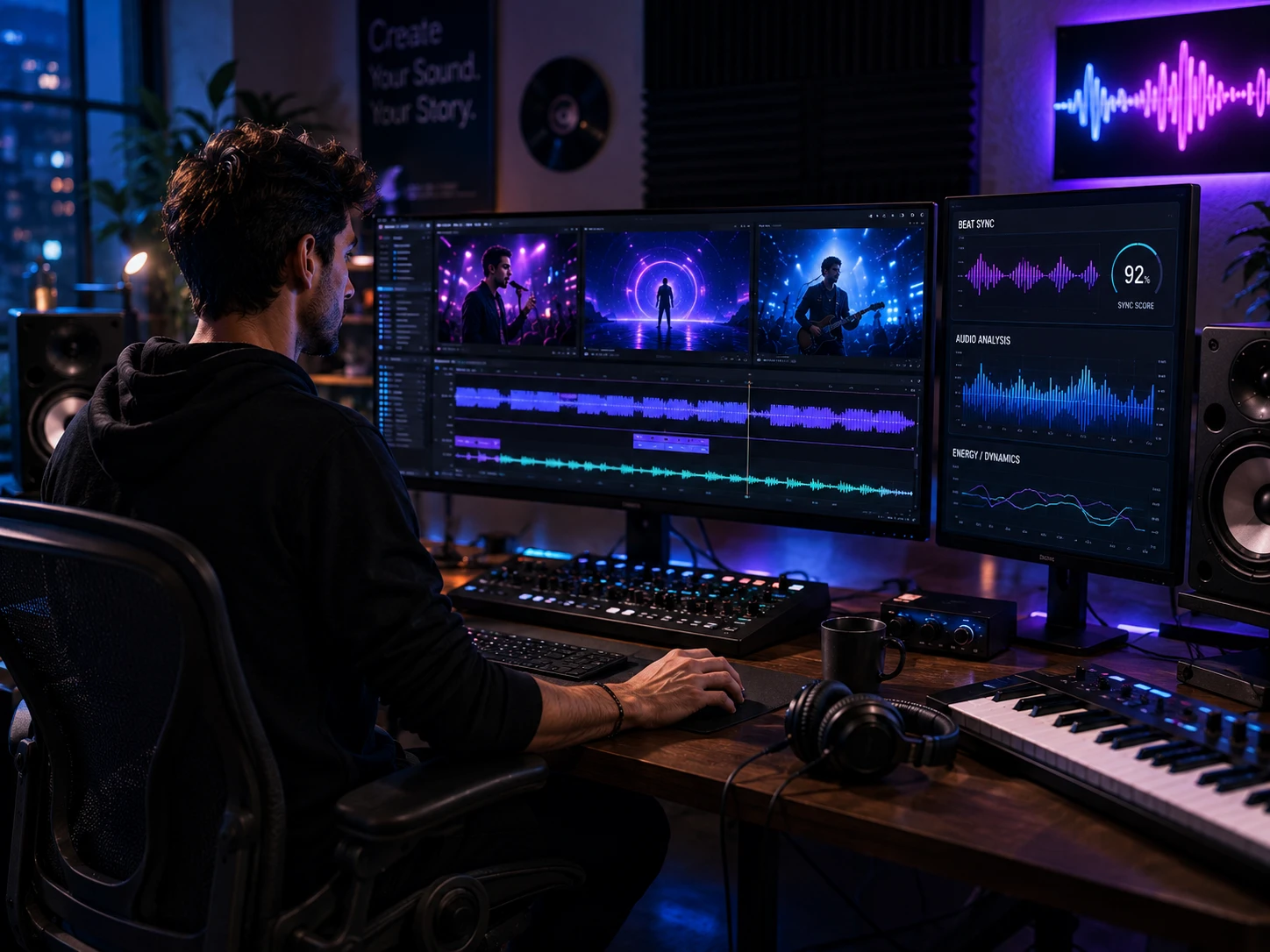
The generative AI music market was valued at $642.8 million in 2024 and is on track to hit $3 billion by 2030 — a 29.5% annual growth rate that tells you exactly how fast this space is moving. Yet here’s the problem nobody talks about: most tools marketed as the best AI music video generator don’t actually understand your music. They generate video clips, play your song on top, and call it a music video. The audio and the visuals have no real relationship.
We tested seven of the most talked-about platforms using the same three tracks — a pop ballad, a hip-hop beat with hard drops, and an ambient electronic piece — and judged every tool on the same criteria: beat synchronization, lip sync accuracy, character consistency, workflow efficiency, and free tier viability. The core question we asked for every single tool was this: does it understand the music, or does it just play music over generic clips?
If you’re an independent musician, a Suno or Udio creator looking to turn your AI-generated tracks into shareable videos, or a content creator who needs music-to-video AI for TikTok or YouTube, this guide tells you exactly which tool matches your use case and budget.
Quick Verdict
⭐ Best Overall: Freebeat — only end-to-end music-first pipeline with beat sync, lip sync + full workflow
🆓 Best Free Option: Freebeat (500 credits, non-renewable) / InVideo AI (weekly renewable, watermarked)
🎵 Best for Suno Users: Freebeat — native Suno link integration, no downloading required
🎨 Best for Abstract/Electronic: Neural Frames — 8-stem audio reactivity
🎬 Best Clip Quality (Manual Edit): Runway or Kling AI
Quick Comparison: Best AI Music Video Generators 2026
| Tool | Free Plan | Starting Price | Beat Sync | Lip Sync | Best For | Our Score |
|---|---|---|---|---|---|---|
| Freebeat | Yes (500 cr, NR) | $9.99/mo | ✅ Full | ✅ 90%+ | All-in-one workflow | 9.4/10 |
| Neural Frames | Limited trial | $5/mo | ✅ Stem | ❌ No | Electronic/abstract | 8.1/10 |
| Kaiber | No (trial only) | $29/mo | ⚠️ Basic | ❌ No | Visual experimentation | 7.6/10 |
| Runway | Limited | $12/mo | ❌ None | ❌ No | Cinematic clip quality | 7.2/10 |
| InVideo AI | Yes (weekly) | $20/mo | ⚠️ Basic | ❌ No | Beginners/social | 6.8/10 |
| Kling AI | Yes (limited) | $6.99/mo | ❌ None | ❌ No | Realism, manual edit | 7.0/10 |
| Pika | Yes (80 cr/mo) | $8/mo | ❌ None | ❌ No | Fast short-form clips | 6.2/10 |
What Is an AI Music Video Generator? (And Why Most Tools Get It Wrong)
The real definition: music-first vs video-first
There are two fundamentally different types of tools in this category, and most articles — including the ones currently ranking — treat them as the same thing. They are not.
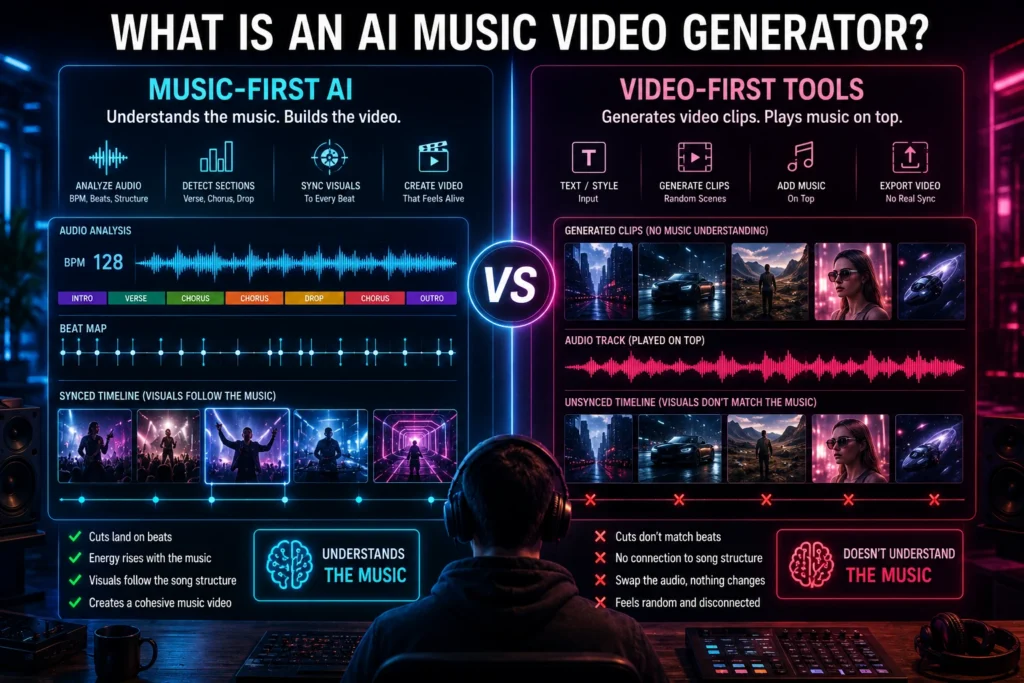
A true AI music video generator takes your audio as the primary input. It analyzes the song’s structure — BPM, individual beats, bar patterns, verse and chorus sections — and uses that map to build visuals that follow the music. Cuts land on beats. Scene energy builds through a chorus. A drop triggers a visual transition. The song drives everything.
A video generator with music works the opposite way. It generates video clips based on a text prompt or style selection, then plays your chosen audio track on top. The visuals have no structural relationship to the music. You could swap the audio for a completely different song and the video would look identical. Most tools marketed as “AI music video generators” fall into this second category — and that gap is exactly what this article is here to expose.
What to look for: 5 features that actually matter
When evaluating any AI music video tool, these are the five criteria that separate a genuine music video generator from a clip tool with a music layer:
- Structural audio analysis — does the tool read BPM, bars, and song sections (verse, chorus, drop, outro)?
- Beat-synchronized cuts and transitions — do visual edits land on actual beats, or are they on a generic timer?
- Lip sync accuracy — for performance-style videos, does character mouth movement align with vocal delivery?
- Character consistency across scenes — does the same person look like the same person from shot to shot?
- End-to-end workflow — can you go from audio file to exported video without opening a separate editing tool?
Who is searching for this?
The audience searching for the best AI music video generator breaks into three main groups. Independent musicians who have a finished track and need a professional visual to release alongside it on YouTube, Spotify Canvas, or TikTok. Suno and Udio creators who are generating full AI-produced songs and need a matching visual pipeline that works with those platforms natively. And content creators who need an AI music visualizer or audio reactive video generator to produce consistent visual content around music without a production budget. All three groups need something different — and not all seven tools in this list serve all three equally well.
How We Tested These AI Music Video Tools
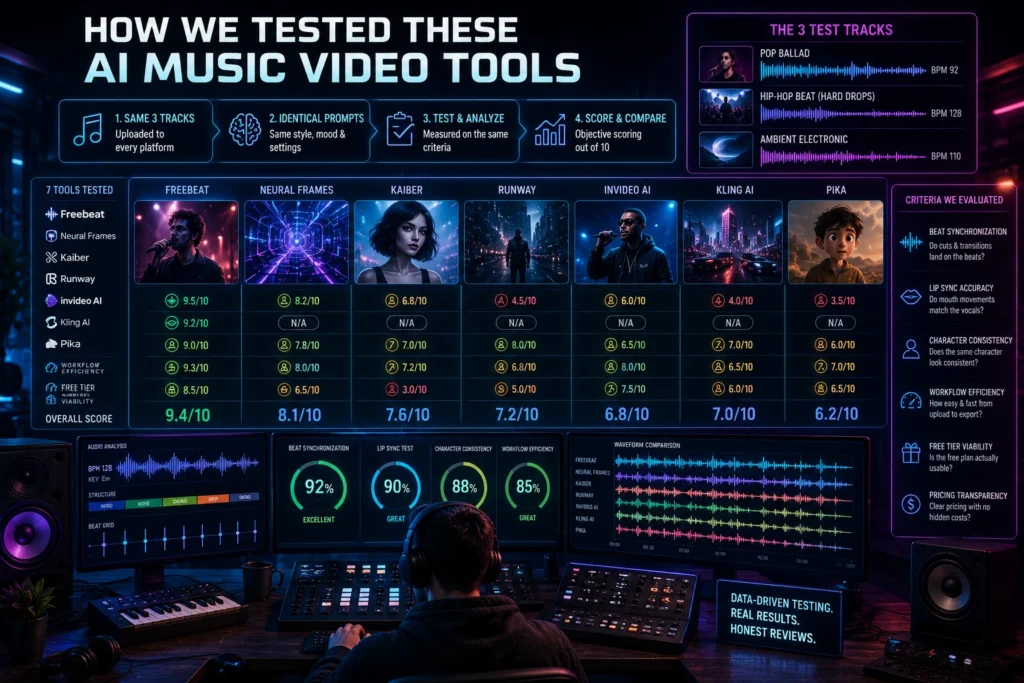
We uploaded the same three tracks to each platform: a pop ballad with a defined verse-chorus structure, a hip-hop beat with hard drops and tempo changes, and an ambient electronic piece with gradual builds and no defined peaks. Each tool was scored on beat synchronization accuracy, lip sync quality where applicable, character consistency across scenes, workflow efficiency from upload to export, free tier viability, and pricing transparency.
For Pika and Kling AI, full music video workflow testing did not apply — neither tool accepts audio as an input. Both are included because they appear frequently in searches for this keyword and readers deserve an honest assessment of what they can and cannot do for music video production. Our core test question for every tool: does it understand the music, or does it just play music over generic video?
Best AI Music Video Generators in 2026: Top 7 Reviewed
Not all AI music video tools are built the same. Some generate clips and drop your audio on top. Others actually read your song’s structure — beats, drops, verse, chorus — and build visuals around it.
We tested seven platforms using the same three tracks to find out which ones genuinely understand music and which ones are just video generators with a music layer.
Each tool below is rated on beat sync accuracy, lip sync quality, workflow efficiency, free tier value, and pricing. Here’s exactly what we found.
#1. Freebeat — Best Overall AI Music Video Generator ⭐ {#freebeat}
What is Freebeat?
Freebeat is the only platform in this comparison built music-first from the ground up. Founded in 2024 by Stanford engineers, the platform now serves over 1 million users across 200+ countries and has generated over one billion seconds of beat-synchronized content. Unlike every other tool in this list, Freebeat’s entire architecture starts with the song — not with the visual.
Why it wins the music video generator test
Freebeat’s audio intelligence operates at four levels simultaneously: BPM detection, individual beat onset, bar-level rhythm patterns, and full song structure analysis covering verse, chorus, drop, and outro. Before generating a single frame, the platform maps the entire song and uses that map to plan shot sequences. In our hip-hop test track — a song with hard drops and irregular tempo changes — every major beat landed on a visual transition. No other tool in this comparison came close to that level of structural sync.
The Suno AI video generator integration is the most seamless we tested. Paste a Suno link directly and Freebeat automatically extracts the audio, runs structural analysis, and begins building a synchronized video — no downloading, no format conversion. The same applies to Udio, YouTube, TikTok, SoundCloud, and direct file uploads (MP3, WAV, MP4). For lip sync accuracy, Freebeat uses vocal phoneme analysis rather than generic mouth animation, achieving 90%+ alignment even on fast lyrical delivery. Character consistency is maintained across up to 2 persistent avatars through 80+ shots — upload your own image, use preset characters, or build a custom avatar from scratch.
The all-in-one output suite is what separates Freebeat from every other tool here. From a single audio input you can generate a full music video, an AI lyric video with karaoke-style timing and .LRC export for streaming platforms, an album cover, animated Spotify Canvas and Apple Music visuals, a dance video using beat-matched choreography, and social clips in 16:9, 9:16, and 1:1 formats. The beat sync video generator, lyric video, and Spotify Canvas all live in the same workspace with no platform switching required.
Freebeat Pricing
| Plan | Price | Credits | Key Limits |
|---|---|---|---|
| Free | $0 | 500 one-time | 30-second max, watermarked, non-renewable |
| Standard | $9.99/month | 3,000/month | 1080p, full feature access |
| Pro | $24.99/month | 10,000/month | Faster processing, priority queue |
| Basic (weekly) | $4.99/week | 1,990/week | Good for burst testing |
| Top-up packs | From $7.99 | 2K–8K credits | Never expire |
| Annual | ~30% off | — | Applied to any monthly plan |
Affiliate program: Not listed publicly.
⚠️ Hidden Cost Warning: Freebeat’s free tier gives you 500 credits that do not renew. If you spend your first session testing different visual styles and prompts, those credits are gone permanently. Budget testers should skip straight to the Basic weekly plan at $4.99/week — it gives you renewable credits and a meaningful amount of runway to evaluate the tool properly without burning a one-time allocation on style experiments.
Freebeat Pros and Cons
Pros:
- Only tool in this comparison with full structural audio sync end-to-end — beats, bars, and song sections all drive the visual output
- All-in-one release package: music video + AI lyric video + album cover + Spotify Canvas in one workspace
- Native Suno, Udio, YouTube, TikTok, and SoundCloud link support — no downloading or format conversion required
- No editing skills required — complete, platform-ready video from audio upload in minutes
Cons:
- Free credits are non-renewable — burns through quickly on style experimentation
- Less manual frame-level control than Runway for power editors who want precise shot overrides
- Short onboarding curve due to feature depth — not a single-button tool
Best for:
Independent musicians releasing singles or albums, Suno/Udio creators who want a complete visual package without hiring a production team, and content creators who need beat-synced visuals for YouTube and TikTok without learning video editing.
#2. Neural Frames — Best for Electronic & Abstract Artists {#neural-frames}

What is Neural Frames?
Neural Frames is a specialist audio-reactive video generator built specifically around stem-level audio analysis. It does not try to be a general-purpose video tool — it targets electronic musicians, ambient producers, and experimental artists whose visual identity lives in abstraction rather than narrative or character performance.
Why it’s relevant (and where it stops)
Neural Frames separates your audio into 8 individual stems — drums, bass, vocals, melody, and more — and maps distinct visual behaviors to each frequency range independently. The kick drum triggers a visual pulse. A synth swell shifts the color field. Bass drops compress and expand the visual plane. This is genuine stem-level reactivity, deeper than the basic energy detection or BPM-only approaches used by most tools. For an audio reactive video generator in the electronic and ambient space, the output feels genuinely engineered for the music rather than loosely responsive to it.
The hard boundary: Neural Frames has no lip sync system, no character engine, and no structural song analysis in the narrative sense. As soon as a performer needs to appear on screen, this tool cannot deliver. It produces abstract and psychedelic visuals tied tightly to frequency data — which is exactly right for some artists and completely wrong for others.
Neural Frames Pricing
| Plan | Price | Key Features |
|---|---|---|
| Explorer | $5/month | Basic generation, limited duration, watermarked |
| Standard | $10/month | Longer videos, faster render, more style options |
| Higher tiers | Varies | 4K export, additional AI models, priority render |
| Signup credits | Free (limited) | Enough to evaluate visual style, not a full video |
Affiliate program: Not confirmed.
⚠️ Hidden Cost Warning: Neural Frames renders are compute-intensive. During peak usage hours, waiting 4–5 minutes per clip is a consistent user complaint — and because the tool requires iterative testing to dial in the right visual response to your specific track, that wait time multiplies quickly. Factor this into your evaluation time before committing to a paid plan.
Neural Frames Pros and Cons
Pros:
- 8-stem audio reactivity is genuinely unique in this category — no other tool maps individual frequency ranges to independent visual layers
- Output quality for electronic and experimental genres is distinctive and high-caliber
- Entry price of $5/month is the lowest paid tier in this comparison
Cons:
- No lip sync, no character system, no narrative structure — a vocalist on screen is outside this tool’s capability
- Slow peak-hour render times (4–5 minutes per clip)
- Does not produce a complete music video workflow — final assembly remains a manual task
Best for:
Electronic, techno, ambient, and experimental artists whose visual identity is abstract and frequency-driven. Not suited to any use case that requires a performer on screen.
#3. Kaiber — Best for Visual Experimentation {#kaiber}
What is Kaiber?
Kaiber is an AI creative suite built around a flexible Superstudio canvas, a Beat Sync engine, and multiple animation modes including Flipbook (frame-by-frame, hand-drawn aesthetic), Motion (smoother and more cinematic), and Transform (style-transfer on existing footage). It gained significant industry credibility when Linkin Park used it to produce their official “Lost” music video — proof it can operate at a professional level.
Features and limitations
The strongest argument for Kaiber is its model access. A single Creator subscription at $29/month gives you access to 15+ AI generation engines — Veo 3.1, Kling 3.0, Luma Ray, Runway Gen-4.5, Flux Pro, and more — under one billing umbrella. Subscribing to those platforms individually would cost well over $100/month. Beat Sync detects BPM and times visual transitions to the track, but it operates at a “vibe match” level — it responds to general energy rather than the structural specifics of a song. There is no verse/chorus detection, no drop-triggered scene change, and no lyric video tool. Character consistency across scenes is essentially nonexistent — each generation is independent, so building a cohesive narrative with a recurring character requires significant manual effort.
Kaiber Pricing
| Plan | Price | Credits | Notes |
|---|---|---|---|
| Flex | Pay-as-you-go | Varies | No monthly commitment, credits roll over |
| Creator | $29/month | 1,500/month | 15+ AI models, Beat Sync, Superstudio, Cuts |
| Pro | $99/month | 5,000/month | Unlimited canvases, unlimited concurrent generations |
| Visionary | Custom | Unlimited | For high-volume studios |
Important: Subscription credits reset monthly with zero rollover. Only separately purchased top-up credit packs roll over permanently.
Affiliate program: Not confirmed.
⚠️ Hidden Cost Warning: Kaiber’s experimental workflow means you need multiple iterations to get a satisfying result. Users consistently report needing 150–200 credits before landing one output they’re happy with. At 1,500 credits per month on the Creator plan, that’s roughly 7–10 usable results per month if you’re iterating heavily — far less than the credit count implies. And because subscription credits reset monthly, any unused portion at month-end disappears.
Kaiber Pros and Cons
Pros:
- Access to 15+ leading AI generation models under one $29/month subscription — significant value for multi-model access
- Superstudio canvas enables layered, non-linear visual experimentation not available in other tools
- Proven at professional level — Linkin Park’s official music video is a documented real-world result
Cons:
- No free plan — trial access only before financial commitment
- Credit burn rate is high for iterative work; subscription credits do not roll over
- No structural audio sync and no dedicated lyric video feature
Best for:
Visual-forward creators who have a strong aesthetic concept and want to experiment with stylized AI footage across multiple generation engines. Not suited to musicians who need a complete, efficient workflow from track to finished video.
#4. Runway Gen-4 — Best Clip Quality for Editors {#runway}

What is Runway?
Runway is the industry-standard AI video generation platform used by professional filmmakers and designers. Gen-4 delivers cinematic motion, sophisticated camera control through Director Mode, and advanced visual editing tools including inpainting, multi-motion brush, and extended clip length. It produces the highest raw clip quality of any tool in this comparison.
The honest limitation for music video use
Runway has zero music-specific features. There is no audio input field, no beat synchronization, no lip sync engine, and no multi-scene composition system. Building a music video in Runway means generating 20–30 individual clips through separate prompt iterations, then importing all of them into Premiere Pro, DaVinci Resolve, or another external editor, manually aligning cuts to the music, and assembling the final video by hand. For a solo independent artist with no editing background, this is not a realistic workflow — the time cost alone makes it prohibitive. Runway is the right tool for filmmakers who want AI-assisted shot generation as source material. It is the wrong tool for a musician who wants a finished video from a finished track.
Runway Pricing
| Plan | Price | Notes |
|---|---|---|
| Free | $0 (limited) | Watermarked, low resolution, restricted credits |
| Standard | $12/month | Entry paid tier |
| Pro | $28/month | More credits, higher resolution |
Credit cost per second of video is high at lower tiers — long music videos will exhaust Standard plan credits quickly.
Affiliate program: Yes — verify current commission rate directly at runwayml.com before publishing affiliate links.
Runway Pros and Cons
Pros:
- Highest raw clip quality in this comparison — lighting, physics, and motion are consistently cinematic
- Director Mode enables precise camera control: zoom, pan, tilt, orbital shots
- Industry-standard tool with documented professional use across film and advertising
Cons:
- Zero music-specific features — no audio input, no beat sync, no lip sync
- Every music video requires full manual assembly in external editing software
- Credit costs scale quickly at lower tiers for any project requiring multiple clips
Best for:
Filmmakers and video editors who want high-quality AI-generated footage as source material and are fully comfortable with manual post-production in a professional editing environment.
#5. InVideo AI — Best for Beginners & Social Content {#invideo}

What is InVideo AI?
InVideo AI is an all-in-one prompt-to-video platform with access to 200+ AI models including Veo 3.1, Sora 2 Pro, and Kling 3.0. Built primarily for social content creators, marketers, and beginners, it turns text prompts or scripts into complete videos with AI voiceover, subtitles, stock media, and background music — all from a single prompt with no editing timeline required.
Features and honest limitations
InVideo AI is genuinely the easiest tool in this comparison to use. The interface is a natural language prompt box — you describe your video and the AI handles script, visuals, voiceover, and music selection automatically. Its free plan is the most sustainably useful in this comparison: weekly credit renewal with no card required, access to Storyblocks and iStock media libraries, and AI voiceover in 50+ languages. For social content creators who need fast, good-looking videos at no cost, it works well.
The key limitation for music video use is fundamental: InVideo AI is not a music-first tool. Music is selected from a library and overlaid on the generated video. There is no audio analysis, no beat synchronization, no structural sync, and no relationship between your actual track and the visual output. If you upload your own song, it plays on top of the video — the visuals were not built around it. This makes it an effective AI music video maker free option for social content, but it does not qualify as a true music video generator for artists releasing original music.
InVideo AI Pricing
| Plan | Price | Key Features |
|---|---|---|
| Free | $0 | Weekly credit reset (Mondays), watermarked, no card needed |
| Paid tiers | From ~$20/month | 5 tiers ranging up to $999/month |
| Add-on credits | Available | On-demand top-ups when monthly allocation runs out |
Affiliate program: ✅ Best terms in this category
- 50% commission on monthly plans
- 25% commission on annual plans
- 120-day cookie window
- No cap on referrals
- Managed via Impact.com with full dashboard transparency
- Commissions apply to the first billing cycle only
⚠️ Hidden Cost Warning: Multiple verified G2 reviews report that credits burn significantly faster than plan marketing implies. One verified user paid $60 for the Max Plan expecting the advertised output volume but received approximately 2 minutes of actual AI-generated video before credits were exhausted — the rest went to processing, regeneration, and edits. Support reportedly refused refunds. Before purchasing any paid plan, check the actual per-generation credit cost for AI video (not just the headline credit number) on InVideo’s current pricing page.
InVideo AI Pros and Cons
Pros:
- Most beginner-friendly interface in this comparison — no learning curve
- Weekly-renewable free plan with no card required; genuinely usable for light social content
- AI voiceover in 50+ languages with natural-sounding delivery
Cons:
- Not a music-first tool — no beat sync, no audio analysis, no structural relationship between track and visuals
- Credit system burns faster than advertised based on verified user reviews
- All free exports are watermarked; watermark removal requires a paid plan
Best for:
Total beginners and social content creators who need fast, polished videos for TikTok, Reels, and YouTube without any editing experience. Not suitable for musicians who need true audio-visual synchronization around their own track.
#6. Kling AI — Best Individual Clip Realism {#kling}

What is Kling AI?
Kling AI is a high-fidelity clip generator from Chinese tech company Kuaishou, producing photorealistic motion with convincing body mechanics and physical interaction. It consistently delivers some of the most realistic human movement of any AI video model available. Worth noting: Freebeat integrates Kling as one of its rendering engines under the hood — which is itself a signal of the clip quality Kling produces.
Features and limitations
For generating individual clips of humans in realistic motion — walking through a space, playing an instrument, interacting with objects — Kling produces results that are genuinely difficult to distinguish from real footage at a glance. The motion physics are convincing and extended clip lengths reduce the per-clip generation overhead. The hard limitation for music video production is the same as Runway: no audio input, no beat synchronization, no multi-scene composition, and no automatic editing. Every music video built in Kling requires generating individual clips through separate prompts, then assembling them manually in an external editor while manually aligning every cut to the music. The hidden time cost of that workflow is significant and often invisible in tool reviews.
Kling AI Pricing
| Plan | Price | Notes |
|---|---|---|
| Free | $0 (limited) | Limited monthly generations, watermarked |
| Standard | ~$6.99/month | Entry paid tier |
| Higher tiers | Varies | More credits, faster generation |
Affiliate program: Not confirmed.
Kling AI Pros and Cons
Pros:
- Best-in-class photorealism for individual clips in this comparison
- Convincing body mechanics — human physical interaction looks genuinely natural
- Accessible free tier for quality evaluation before paying
Cons:
- No audio input — zero music workflow capability
- Full music video requires complete manual assembly in external editing software
- No character consistency across separate generation sessions
Best for:
Creators with existing professional editing workflows who want photorealistic AI-generated footage as source material for music video production. Not viable as a standalone music video solution for artists without editing skills.
#7. Pika — Best for Fast Short-Form Social Clips {#pika}
What is Pika?
Pika is a fast, accessible AI clip generator from Pika Labs designed for rapid iteration on short-form social content for TikTok, Reels, and YouTube Shorts. It operates on a credit-based system and ships its own proprietary effects suite: Pikaffects (preset visual transformations like inflate, melt, explode), Pikascenes (multi-element scene building), Pikatwists (style transfer on existing footage), and Pikaframes (keyframe interpolation for clips up to 25 seconds). For the best AI music video generator for TikTok in terms of raw clip generation speed, Pika is the fastest option tested.
Features and real limitations for music video use
Pika generates clips quickly — seconds per generation — and the stylized effects are well-suited to the high-energy, attention-grabbing aesthetic that performs on short-form platforms. The free plan is among the most genuinely usable in this category: 80 credits per month, commercial use allowed, no card required. Multiple aspect ratios are supported natively (16:9, 9:16, 1:1, 4:5, and more), which removes the formatting step for platform-specific publishing.
The limitations for music video production are fundamental and non-negotiable: Pika has no audio input, no beat synchronization, no structural song analysis, no lip sync, and no character consistency across separate generations. Default clip length is 3–5 seconds. Producing a 3-minute music video in Pika requires a minimum of 36–60 individual clip generations plus complete manual assembly in an external editor while manually aligning every cut to the music — a workflow that is both time-consuming and far outside what most musicians are looking to do.
Pika Pricing
| Plan | Price | Credits | Key Features |
|---|---|---|---|
| Free | $0 | 80/month | 480p only, commercial use, watermarked |
| Basic | $8/month | 700/month | 1080p, watermark-free, all Pikaffects, commercial |
| Standard | ~$28/month | 2,300/month | Faster queue, Turbo + Pro model access |
| Pro | ~$35–40/month | 6,000/month | Fastest queue, daily high-volume use |
Important: Subscription credits reset monthly with no rollover. Only separately purchased top-up credit packs roll over to the next month.
Affiliate program: Limited creator partnership program exists for Pro subscribers. Commission terms listed as “varies (one-time)” — specific rates unconfirmed.
⚠️ Hidden Cost Warning: Pika’s default clip length is 3–5 seconds. A 3-minute music video requires between 36 and 60 separate clip generations at minimum — more when accounting for rejected takes. At higher resolutions and with effects like Pikatwists, each generation consumes more credits than basic clips. Monthly subscription credits do not roll over, so any unused credits at month-end are permanently lost. Calculate your actual required generation volume before choosing a plan.
Pika Pros and Cons
Pros:
- Genuinely usable free plan: 80 credits per month, commercial use allowed, no card required
- Fastest clip generation speed in this comparison — seconds per clip
- Strong stylized effects (Pikaffects) purpose-built for viral short-form content
Cons:
- No audio input — zero relationship between music structure and generated visuals
- Default 3–5 second clips require dozens of separate generations for a full music video
- No character consistency between independent generation sessions
Best for:
Content creators who need fast, stylized, attention-grabbing short clips for TikTok, Reels, and YouTube Shorts. For producing a true music video where the visuals sync to your track, Freebeat handles that workflow — Pika does not.
How to Choose the Right AI Music Video Generator
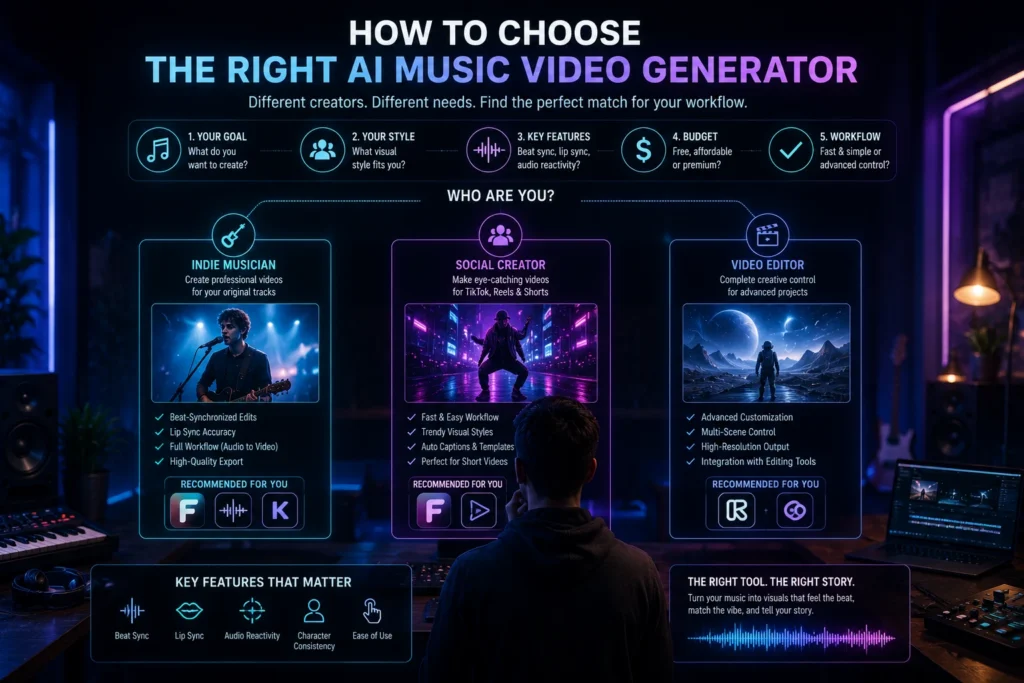
If you’re an indie musician who wants a complete release package
Freebeat is the answer. It is the only tool in this comparison that handles the complete release visual stack — music video, AI lyric video, album cover, and Spotify Canvas — in a single workspace without requiring editing skills. Start on the free tier to run a 30-second test of your actual track and verify the beat sync yourself. If the output matches what you’re hearing, the Standard plan at $9.99/month covers full-length 1080p music video production. For best AI music video generator for indie musicians, nothing else in this list comes close to the same end-to-end capability.
If you make electronic, ambient, or experimental music
Neural Frames is built for your use case. The 8-stem audio reactivity produces visuals that respond to individual frequency components of your track — the output feels genuinely engineered for the music rather than loosely synced to its general energy. At $5/month entry price, the risk is low. The only limitation worth restating: the moment you want a performer on screen, Neural Frames cannot help you. It produces abstract visuals, not character-driven narratives.
If you use Suno or Udio to make your music
Use the Suno AI video generator integration in Freebeat. Paste your Suno link directly into Freebeat’s interface — the platform extracts the audio, runs structural analysis on the full song, and begins building a synchronized video without any downloading or format conversion. The same native link support applies to Udio. No other tool in this comparison has a direct integration with AI music generation platforms.
If you’re a total beginner who just wants something fast
InVideo AI for social content. The free plan renews weekly with no card required, and the interface requires zero video production knowledge. Be clear on what you’re getting: InVideo is an effective AI music video maker free option for social clips with music overlaid — it is not a platform that syncs visuals to your original track’s structure. For actual music videos, even beginners are better served by Freebeat’s automated pipeline, which requires no editing skills but does require understanding its workflow.
If you’re a video editor who wants AI footage
Runway or Kling AI. Both produce the highest quality individual clips in this comparison, and both require you to handle the full assembly workflow manually in your preferred editing software. Runway has slightly more sophisticated camera control; Kling has more convincing human body mechanics. Neither is viable for musicians who want a finished video without editing experience.
Best AI Music Video Generator 2026: Final Verdict
| Category | Winner | Why |
|---|---|---|
| Best Overall | Freebeat | Only music-first end-to-end pipeline in the category |
| Best Free Option | InVideo AI | Weekly-renewable credits, no card needed |
| Best for Suno Users | Freebeat | Native Suno link integration, no downloading |
| Best Electronic/Abstract | Neural Frames | 8-stem audio reactivity at $5/month entry |
| Best Clip Quality | Runway | Cinematic output — requires manual assembly |
| Best Budget Entry | Pika | $8/month, commercial use allowed, fast clips |
| Most Overhyped | Runway | Excellent technology, wrong category for musicians |
If you only have time to test one tool, start with Freebeat’s free tier — 500 credits is enough to run a 30-second video of your actual track and evaluate the beat sync quality for yourself. If the output aligns with your track the way it should, the Standard plan at $9.99/month covers everything you need for a complete release visual workflow.
Frequently Asked Questions About AI Music Video Generators
What is the best AI music video generator in 2026?
For most independent musicians and Suno/Udio creators, Freebeat is the best AI music video generator in 2026 — it is the only platform that analyzes song structure end-to-end and syncs visuals to beats, drops, and sections automatically. For electronic and abstract artists, Neural Frames offers superior 8-stem audio reactivity at $5/month. For beginners who want free social content without editing skills, InVideo AI provides a weekly-renewable free plan.
Can I make an AI music video for free?
Yes — with important caveats. Freebeat’s free plan gives you 500 non-renewable credits for 30-second watermarked videos. InVideo AI’s free plan resets weekly with no card required but also watermarks exports. Both are viable for testing and short social clips using AI music video maker free options. For watermark-free output, Freebeat Standard at $9.99/month is the lowest paid entry point.
What AI tool turns music into video?
Freebeat is the most direct answer for music to video AI — you upload an audio file or paste a link from Spotify, YouTube, Suno, Udio, TikTok, or SoundCloud, and the platform analyzes the track and builds a synchronized video around it. No other tool in this comparison accepts audio as the primary input and constructs visuals from the song’s structure.
Is Freebeat the best AI music video generator?
For most independent musicians — yes, because it is the only platform that reads BPM, beat patterns, and full song structure to build visuals that genuinely follow the music. For electronic and abstract artists whose visual identity does not involve a performer on screen, Neural Frames may be a better fit because its 8-stem frequency analysis produces output that feels more precisely tied to the audio’s texture. For editors who want maximum cinematic quality on individual clips and are comfortable with manual assembly, Runway leads on raw clip realism.
How do I make a music video with AI?
Choose a music-first tool — Freebeat is the recommended starting point for most artists
Upload your track directly or paste a link from Suno, Spotify, YouTube, or Udio
Describe your visual concept in plain language — style, mood, setting, characters
Review the AI-generated storyboard and adjust per-scene prompts where needed
Export in your target format: 16:9 for YouTube, 9:16 for TikTok and Reels, 1:1 for Instagram
What is the best free AI music video maker?
For one-time testing with actual beat sync: Freebeat’s 500 non-renewable credits let you run a 30-second synced video at no cost. For ongoing free use: InVideo AI resets weekly every Monday with no card required. Both watermark free exports on their free tiers. For watermark-free music video output, Freebeat Standard at $9.99/month is the lowest entry point that covers a full release workflow as an AI music video maker free upgrade path.
The Bottom Line
The AI music video market is growing at 29.5% annually — but most tools still don’t genuinely sync to music. They layer audio on top of generated clips and call it a music video. The tools that earned the top spots in this comparison work differently: they treat your song as the input, not an afterthought.
Match your tool to your actual use case:
- Making full music videos from original tracks → Freebeat
- Electronic or abstract visual identity → Neural Frames
- Fast social content with minimal setup → InVideo AI
- Professional editing workflow, AI footage as source material → Runway or Kling AI
- Fast short-form TikTok and Reels clips → Pika
Pricing and feature availability change frequently in this category. This article was last updated May 2026. Verify current pricing at each tool’s official pricing page before purchasing. Refresh scheduled every 90 days.
Disclosure: This article contains affiliate links. If you purchase through our links we may earn a commission at no extra cost to you.