
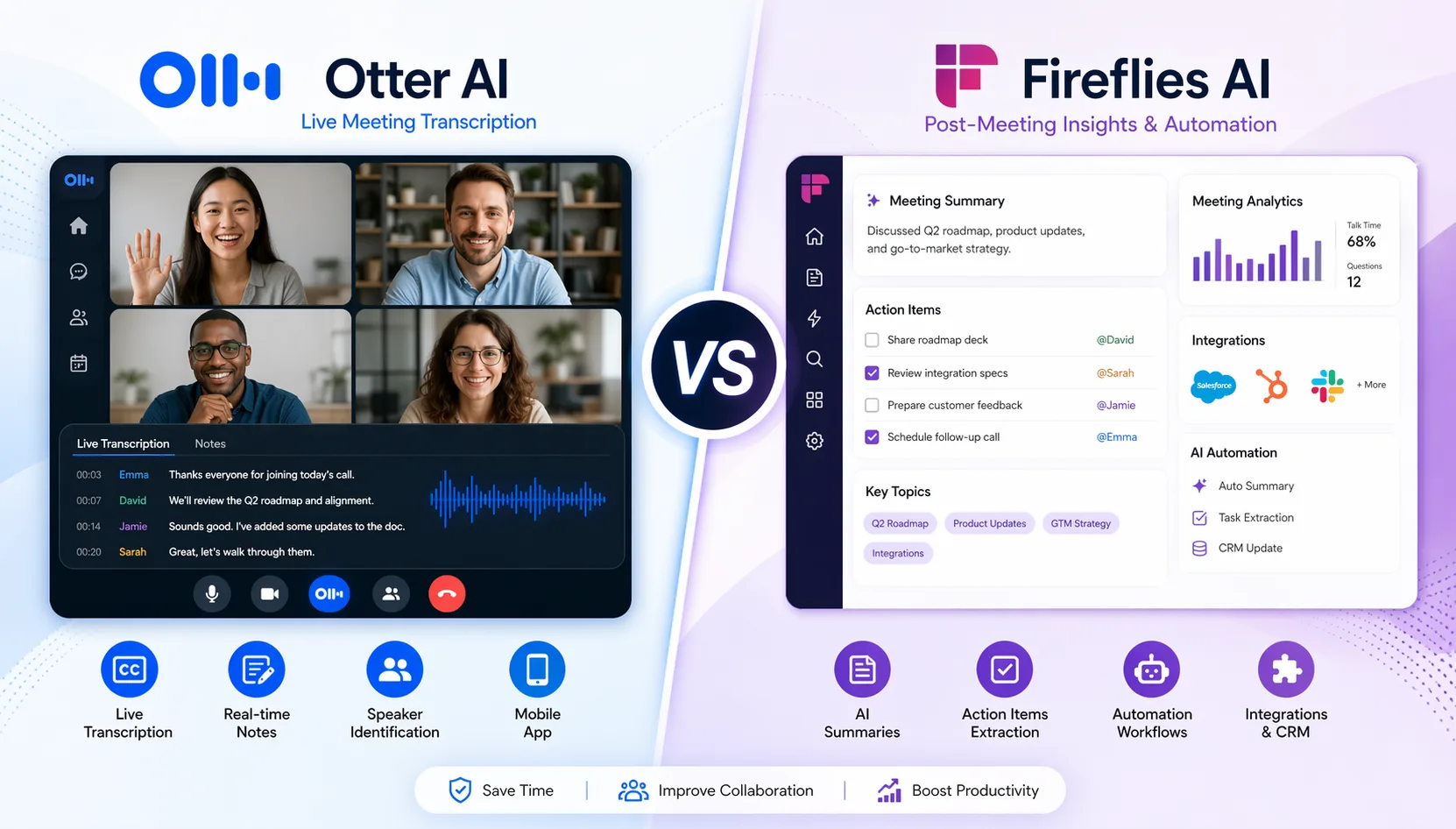
If you’re deciding between Otter AI vs Fireflies AI, the short version is simple: Otter is better for live transcription during meetings, while Fireflies AI is better for post-meeting summaries, automation, and team workflows.
That difference matters more than most comparison blogs admit. These tools may look similar on the surface, but they solve different problems. If you mainly want to follow the conversation live, capture notes in real time, and use a clean mobile app, Otter makes more sense. If you want your meetings to turn into structured summaries, CRM updates, searchable insights, and automated follow-ups, Fireflies is usually the stronger pick.
For most teams in 2026, Fireflies AI is the better overall choice. For solo users, students, and anyone who cares most about the live meeting experience, Otter AI still has a real edge.
Quick Verdict — Best Choice by Use Case
| Use Case | Winner |
|---|---|
| Best overall | Fireflies AI |
| Best for live transcription | Otter AI |
| Best for individuals (English) | Otter AI |
| Best for teams + automation | Fireflies AI |
| Best free plan | Fireflies AI (with caveats) |
| Best for multilingual meetings | Fireflies AI |
Otter and Fireflies overlap enough to confuse buyers, but the split is pretty consistent in real use. Otter wins inside the meeting, where live transcription, annotation, and mobile capture matter most. Fireflies wins after the meeting, where summaries, integrations, automation, and multilingual support become the deciding factors.
Otter AI vs Fireflies AI — What’s the Real Difference?
The real distinction is this: Otter AI is a live transcription tool; Fireflies AI is a post-meeting intelligence platform.
That sounds subtle, but it changes how each product feels day to day. Otter is built around helping you stay aligned with a conversation while it’s happening. The transcript updates live, teammates can annotate in real time, and the overall experience feels lightweight and immediate. It’s especially useful for students, journalists, researchers, and small teams that want simple meeting capture without much setup.
Fireflies takes a different approach. Its main value shows up after the call ends. It organizes transcripts into structured summaries, pushes notes into other tools, tracks metrics like talk time and sentiment, and fits much better into sales, recruiting, and customer success workflows.
They overlap on the basics: both record meetings, generate transcripts, produce summaries, and connect to major meeting platforms. But if you choose based on feature checklists alone, you’ll miss the more important question: do you need help during meetings, or do you need help turning meetings into follow-up work?
Feature-by-Feature Comparison — What Matters in Real Use
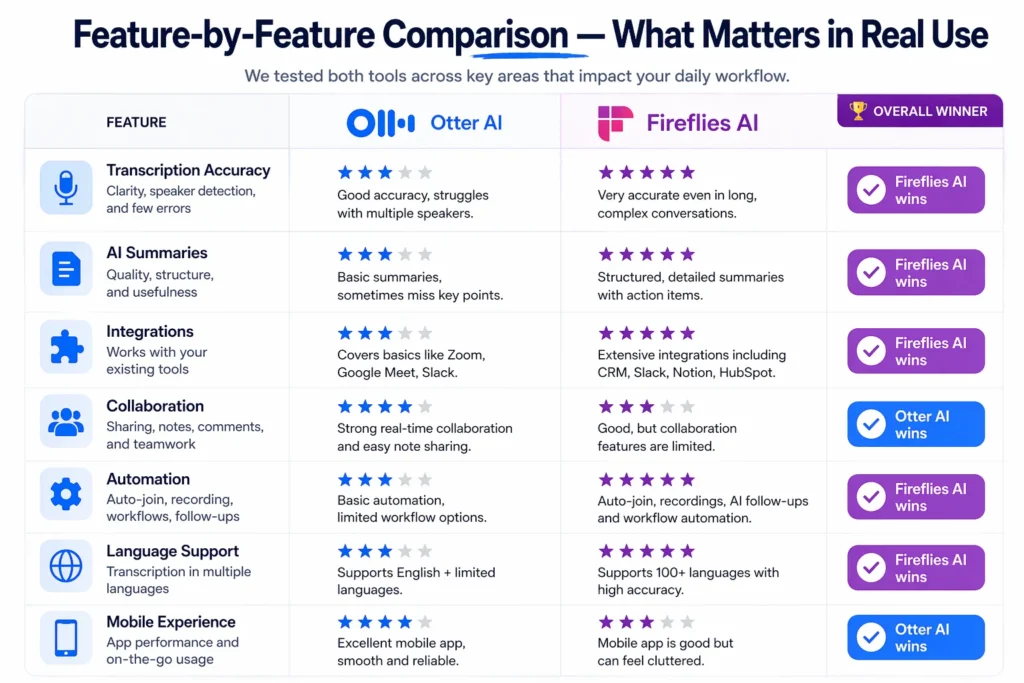
Not all features are equal. Here’s what actually changes day to day.
Transcription Accuracy — Who Gets It Right in the Real World?
Winner: Fireflies AI
If your meetings are clear, English-only, and involve two or three speakers with decent microphones, both tools are usable. In those conditions, Otter often lands in the 85% to 94% accuracy range, which is good enough for general note-taking and review.
Fireflies tends to do better once real-world messiness enters the picture. Background noise, overlapping speakers, stronger accents, and multilingual conversations expose Otter’s limits faster. Fireflies generally performs in the 90% to 95% range in standard conditions and is noticeably stronger for non-English meetings.
The practical takeaway is simple: for clean English meetings, both are fine; for anything more complex, Fireflies is safer.
AI Summaries — Useful Insights or Just a Wall of Text?
Winner: Fireflies AI
This is one of the biggest differences between the two tools.
Otter’s summaries are serviceable, but they often feel generic. You’ll usually get a broad recap of what happened, but not always in a format that’s easy to hand to a manager, sales rep, recruiter, or client-facing team. It captures moments; it doesn’t always turn them into structured outputs.
Fireflies is better at turning raw meeting content into something operational. Its summaries are more organized, and the customizable sections matter a lot for teams that need consistency. Sales teams may want objections, next steps, and deal risks. Recruiting teams may want candidate strengths and concerns. Customer success teams may want churn signals and action items. Fireflies is much better at that level of structure.
If summaries are something you actually use, rather than just glance at, Fireflies has the edge.
Integrations — Which Tool Fits Your Existing Stack?
Winner: Fireflies AI
Otter supports the big three meeting platforms: Zoom, Microsoft Teams, and Google Meet. For many individual users, that’s enough. But once you want your meeting assistant to connect cleanly with your broader workflow, Otter starts to feel limited unless you’re paying for higher tiers.
Fireflies is much stronger on integration breadth. It works with more conferencing platforms and is built with downstream workflows in mind. That includes tools like HubSpot, Salesforce, Slack, Notion, and Asana, especially on the Business plan, which is the realistic tier for most teams.
Otter does offer stronger Salesforce-oriented depth at the high end, but there’s a catch: much of that value is pushed into Enterprise pricing. For teams that want integrations without negotiating an expensive enterprise contract, Fireflies is usually the better fit.
Collaboration Features — Working Together Before and After Meetings
Winner: Otter AI
This is where Otter still stands out.
Otter is excellent when collaboration happens during the meeting itself. Real-time annotation, live transcript following, AI Channels organized by project, and in-meeting interaction make it feel more collaborative than Fireflies in the moment. It also captures slides, which can be genuinely useful for classes, presentations, and internal team calls.
Fireflies supports collaboration too, but it’s mostly post-meeting collaboration: comments, bookmarks, and review after the transcript is ready. That’s useful, but it’s a different experience.
If your team actively works with the meeting while the call is happening, Otter has no real competitor in this comparison.
Automation Capabilities — Beyond Notes, Into Workflows
Winner: Fireflies AI
Otter is primarily a note-taking and transcription product. It can help you capture the meeting, but outside of higher enterprise tiers, it doesn’t do much to automate what happens next.
Fireflies is built for that next layer. It can route notes to Slack, push structured meeting data to CRMs, trigger workflows through Zapier, and help teams build repeatable post-meeting processes. That matters most when meetings happen at scale. A few meetings per week is manageable by hand. Twenty or fifty meetings per week is not.
This is where Fireflies moves from “nice note taker” to “workflow tool.” If your bottleneck is not recording meetings but turning meetings into action, Fireflies is clearly stronger.
Language Support — The Feature That Eliminates One Tool Immediately
Winner: Fireflies AI
For multilingual teams, this comparison ends fast.
Otter supports English, French, and Spanish. That’s enough for some users, but too narrow for global teams, international recruiting, multinational sales, or mixed-language internal calls.
Fireflies supports 100+ languages, which makes it far more practical in international settings. This isn’t a minor edge. It’s a gating factor.
If your meetings involve more than a small set of supported languages, Fireflies is the only serious option between the two.
Mobile vs Desktop Experience — Recording On the Go
Winner: Otter AI for mobile; roughly tied on desktop
Otter’s mobile experience is one of its most underrated advantages. If you record in-person meetings, interviews, lectures, or field conversations, the mobile app is genuinely useful. That makes Otter especially appealing for journalists, consultants, students, and researchers.
Fireflies is much more oriented around cloud-based online meetings. It works best when meetings already happen inside virtual platforms and the bot can join or the recording pipeline is already built into your workflow.
On desktop, both are strong enough for standard use. On mobile, Otter is clearly better.
Pricing Breakdown — What You Actually Get (Hidden Costs Included)
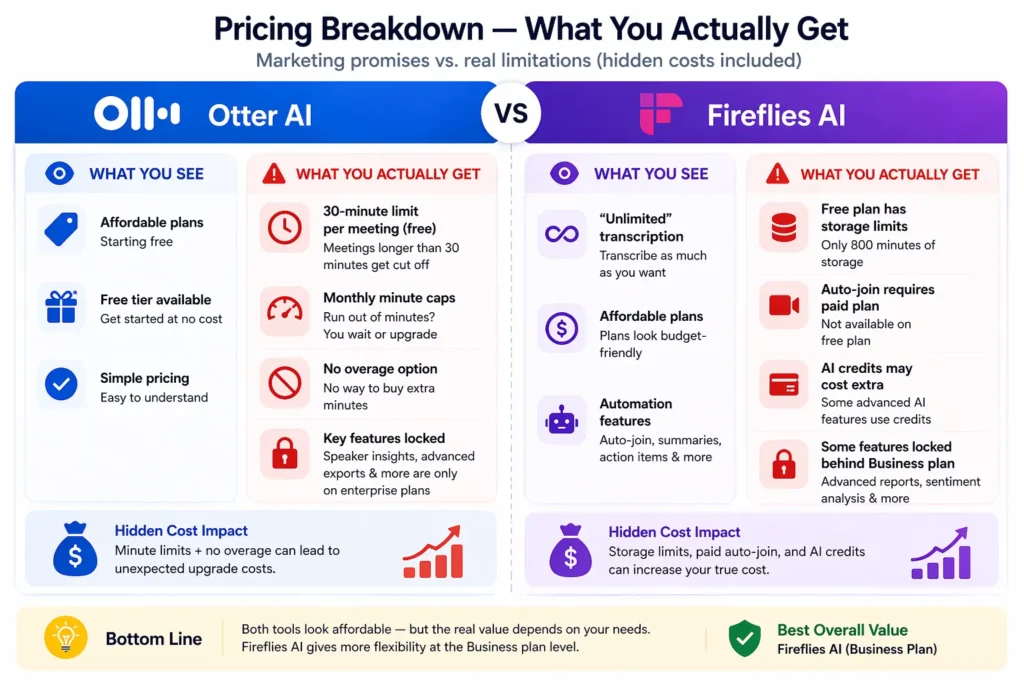
Both tools have free plans. Neither free plan is built for professional daily use.
Otter AI Pricing — What Each Plan Really Includes
| Plan | Price | What It Means in Practice |
|---|---|---|
| Free | $0 | Usable only for light testing or short meetings because of the 30-minute hard cap per conversation |
| Pro | $8.33/mo annual | Affordable for individuals, but the 1,200 monthly minute cap is very real |
| Business | $20/mo annual | Better for teams, but still not the strongest value compared with Fireflies Business |
| Enterprise | Custom, often around $17K–$35K/yr | Required for Otter’s more serious sales and CRM intelligence features |
Otter’s pricing looks reasonable at first glance, especially for solo users. The problem is that its limits are hard limits. The free plan’s 30-minute cap per conversation means a normal one-hour meeting can’t be fully transcribed. That makes the free tier more like a demo than a working plan.
The Pro plan is attractively priced, but the 1,200-minute monthly limit can become a real problem for anyone in a meeting-heavy role. More frustratingly, there’s no overage option. If you hit the cap, transcription stops until the billing cycle resets or you upgrade.
Another important catch: OtterPilot for Sales and deeper CRM intelligence are enterprise-only. If you’re evaluating Otter as a serious sales tool, the headline pricing can be misleading.
There’s also a billing issue worth noting. Some users complain that receipts are opt-in by default, which increases the chance of unnoticed recurring charges.
Fireflies AI Pricing — What Each Plan Really Includes
| Plan | Price | What It Means in Practice |
|---|---|---|
| Free | $0 | More usable than Otter’s free tier, but still limited by storage and manual workflows |
| Pro | $10/mo annual | Fine for individuals, but lacks some features teams actually need |
| Business | $19/mo annual | The real sweet spot for teams: unlimited storage, video, and broader integrations |
| Enterprise | $39/mo annual | More advanced admin and organizational control without Otter-level price jumps |
Fireflies wins on flexibility, but the free plan is not quite as generous as “unlimited transcription” suggests. In practice, the biggest limitation is that auto-join bot behavior is gated behind paid usage, so free users often have to manually manage participation and invites. There’s also an 800-minute storage cap, which can fill surprisingly quickly if you meet regularly.
The Pro plan is decent, but it leaves out a few things that matter in real workflows. Video recording isn’t included, and some of the more useful integrations remain limited.
For teams, Business is the realistic starting point. That’s where Fireflies becomes compelling: unlimited storage, video, and stronger CRM and workflow integrations at a lower price than Otter Business.
One thing buyers should watch closely is AI credits. Some advanced summary and AI features may consume separate credits, which can create variable costs for heavy users.
Which Tool Gives You Better Value?
For free users, Fireflies has the edge because it gives you more room to test the product in real conditions, even with limitations. Otter’s 30-minute cap is simply too restrictive for standard business use.
For individual power users, the comparison is tighter. Otter Pro at $8.33/month is slightly cheaper than Fireflies Pro at $10/month, and if your needs are mostly live transcription in English, that lower price is defensible. But Fireflies often offers more total capability for only a small price difference.
For teams, Fireflies Business at $19/month is the better value than Otter Business at $20/month. You get stronger integrations, unlimited storage, and fewer workflow bottlenecks.
For enterprise buyers, the gap widens. Otter’s higher-end sales functionality often requires a steep jump into custom pricing, while Fireflies Enterprise starts at a much more accessible per-user price.
[See Otter AI Plans]
[See Fireflies AI Plans]
Real User Experience — What People Actually Complain About
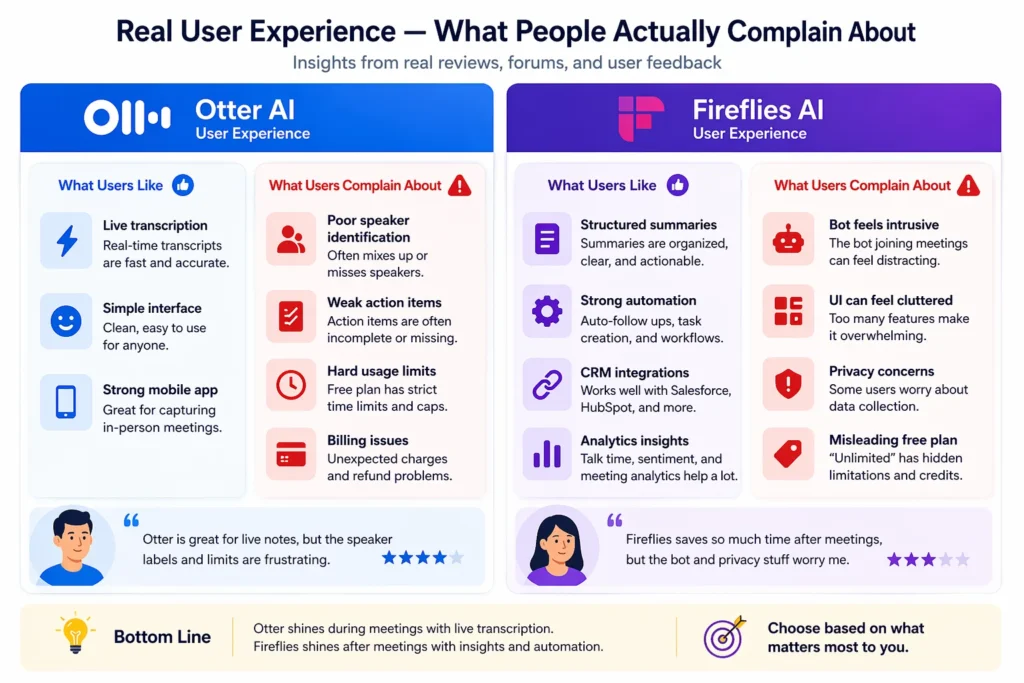
Review sites and Reddit threads tell a different story than product pages.
Otter AI — What Works and What Frustrates Users
What works:
- Best live transcription experience in the market. Otter feels fast, responsive, and genuinely useful during the meeting itself.
- Simple onboarding. It’s one of the easiest tools in the category to start using without training or setup friction.
- Strong mobile app. For in-person meetings and interviews, it’s more useful than most competitors.
What frustrates users:
- Speaker identification breaks down in larger meetings. Once you get into four or more people, transcripts often fall back to generic labels like Speaker 1 and Speaker 2.
- Action item extraction is weak. Users still end up manually reviewing transcripts to find decisions and follow-ups.
- Minute caps create hard stops. There’s no graceful overage or pay-as-you-go option when usage spikes.
- Billing complaints keep coming up. Recurring charges and missing receipts are a repeated frustration.
- Support gets described as slow and generic. That matters more when transcription or billing issues affect a live workflow.
Fireflies AI — What Works and What Frustrates Users
What works:
- Structured post-meeting summaries are excellent. This is one of Fireflies’ clearest strengths.
- Automation saves real time. CRM pushes, Slack routing, and workflow automations are meaningful for sales and customer-facing teams.
- Analytics are deeper. Sentiment analysis and talk-time metrics give teams more than just a transcript.
What frustrates users:
- The bot can feel intrusive. It often joins calendar events by default, which creates friction for privacy-sensitive teams.
- Some users report the bot returning unexpectedly. That’s the kind of behavior that creates trust issues fast.
- The interface is denser than Otter’s. It does more, but it can also feel heavier and slower.
- The free plan marketing can be misleading. “Unlimited transcription” sounds broader than the practical free-tier experience.
- Privacy concerns are a serious issue. Lawsuit exposure and consent concerns make Fireflies a riskier choice in some environments.
You Should Choose Otter AI If…
- You need to follow along with the transcript during the meeting in real time.
- Your team is entirely English-speaking and your calls usually have clear audio quality.
- You frequently record in-person meetings and need a genuinely good mobile app.
- You want to search and synthesize insights across past meetings, especially for personal research or study.
- You’re a student, journalist, consultant, or researcher capturing lectures, interviews, or field notes.
- Simplicity matters more to you than deep integrations and workflow automation.
You Should Choose Fireflies AI If…
- Your team uses conferencing platforms beyond just Zoom, Teams, or Google Meet.
- You regularly have non-English speakers in meetings.
- You need structured post-meeting summaries for sales, recruiting, customer success, or hiring workflows.
- CRM integration with HubSpot or Salesforce is a real requirement and you don’t want enterprise pricing.
- Your team handles 20+ meetings per week and needs automation without minute caps getting in the way.
- You want analytics like sentiment tracking, talk-time measurement, and topic monitoring built into the tool.
When Neither Tool Is the Right Choice
There are cases where the right answer is not Otter or Fireflies.
Regulated industries: If you work in healthcare, legal, finance, or any environment with strict data governance requirements, both tools may introduce more risk than convenience. Standard plans typically won’t satisfy the legal, compliance, and retention controls these teams need.
All-party consent states: In jurisdictions where every participant must consent to recording, auto-joining bots and passive recording workflows create obvious legal and operational risk. If your process for notice and consent is weak, neither tool is a comfortable default choice.
Advanced sales intelligence: If your organization wants deal risk scoring, rep coaching, call benchmarking, or pipeline intelligence, both tools will feel limited. They are meeting assistants, not full revenue intelligence platforms.
In these cases, alternatives like Jamie AI, tl;dv, or Gong are usually better aligned with the actual need.
Hidden Limitations Most Comparison Blogs Don’t Mention
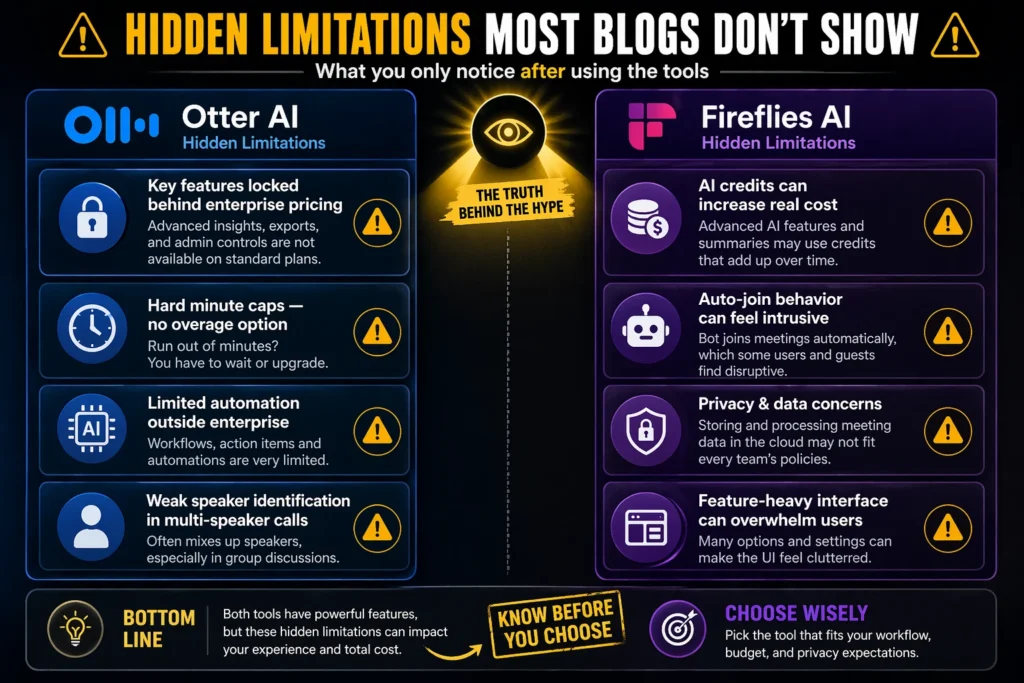
Here are the details that usually get buried:
- Otter’s sales features are enterprise-only. If you want serious CRM intelligence, the accessible low-cost plans are not enough.
- Fireflies’ “unlimited transcription” comes with an asterisk. The free plan is usable, but not as frictionless as the marketing suggests.
- Otter has no overage pricing. When you hit your cap, the workflow simply stops.
- Fireflies video recording requires Business. Pro users may discover too late that visual meeting context is missing.
- Both tools face privacy and consent concerns. That matters much more than feature lists suggest.
- Fireflies AI credits can add variable cost. Heavy use of advanced AI features may make the real monthly bill less predictable.
Final Verdict — The Right Tool Depends on One Question
Here’s how to make the decision in under 60 seconds: do you need help during the meeting, or after the meeting?
If the answer is during the meeting, choose Otter AI. Its live transcription, mobile recording, real-time collaboration, and simpler interface still make it the better tool for individuals and live note-taking workflows.
If the answer is after the meeting, choose Fireflies AI. It offers better summaries, stronger automation, broader integrations, multilingual support, and better team scalability without pushing critical functionality into expensive enterprise plans.
The final breakdown
- If you need live, real-time transcription → Otter AI
- If you need multilingual support → Fireflies AI
- If you’re a solo user on a budget → Otter AI free plan, but watch the 30-minute cap
- If your team uses HubSpot or Salesforce → Fireflies AI Business
- If you work in a regulated industry or all-party consent state → Neither
- If you want the best post-meeting notes for a standard business team → Fireflies AI
Best overall: Fireflies AI
Best for individuals: Otter AI for English-only personal use
Best for teams: Fireflies AI Business
Frequently Asked Questions
Is Fireflies AI better than Otter AI?
For most teams, yes. Fireflies is stronger on summaries, integrations, automation, multilingual support, and post-meeting workflows. Otter is better if your top priority is live transcription during the meeting.
Which tool has more accurate transcription?
Fireflies usually performs better in real-world conditions, especially with accents, noisy audio, and non-English meetings. Otter is still strong for clean English conversations, but it becomes less reliable as meeting complexity increases.
Is the Otter AI free plan actually usable?
It’s usable for occasional short meetings, testing, or personal experiments. The 30-minute hard cap per conversation makes it a poor fit for standard one-hour business meetings.
Does Fireflies AI work with Zoom?
Yes. Fireflies supports Zoom, Microsoft Teams, Google Meet, and several other conferencing platforms. Otter supports the big three, but its platform coverage is narrower overall.
Which meeting assistant is better for sales teams?
For most sales teams, Fireflies AI Business is the more practical choice because it supports structured notes and CRM workflows without forcing an enterprise contract. Otter’s more advanced sales functionality is generally locked higher up the pricing ladder.
Are Otter AI and Fireflies AI safe to use for confidential meetings?
Not automatically. For confidential, regulated, or legally sensitive conversations, both tools should be reviewed carefully before deployment. Consent rules, data handling, and internal compliance requirements matter more than convenience here.





[…] Also Read: Otter AI vs Fireflies AI: Which Meeting Assistant Is Actually Worth It in 2026? […]